How to schedule Instagram Reels in advance (app, Planner, ChatGPT)
Instagram schedules Reels up to 30 days ahead, 25 a day, on a public account. The exact taps, the Planner route, and how to queue one from ChatGPT or Codex.
Yes. Instagram schedules Reels inside its own app: tap Create, choose Reel, and under More options turn on Schedule this reel to pick a date and time. Instagram's help page documents a limit of 25 scheduled posts a day, up to 30 days in advance, and it asks for a public account, not a professional one.
That covers the queue. It does not cover the writing, and it does not let you schedule from where you already work. If your drafts start in ChatGPT or Codex, the last section below shows the connector route, which keeps one approval step between the draft and the queue.
The three routes, and what each one requires
- Instagram app. Free, native, schedule up to 30 days ahead, 25 posts a day, public account. Best for a hands-on Reel you have already edited in the app.
- Meta Business Suite Planner. Free, desktop, needs content permissions on the account, and its calendar view covers posts, stories, Reels and ads together. Best when you also run a Facebook Page and want one calendar.
- A connector inside ChatGPT or Codex. Needs a hosted MCP server and an approved authorisation, and your account must be one the publishing API serves — Instagram professional accounts, business or creator. Best when the caption, the hook and the timing all come out of a conversation.
Step 1 — Confirm you are allowed to schedule at all
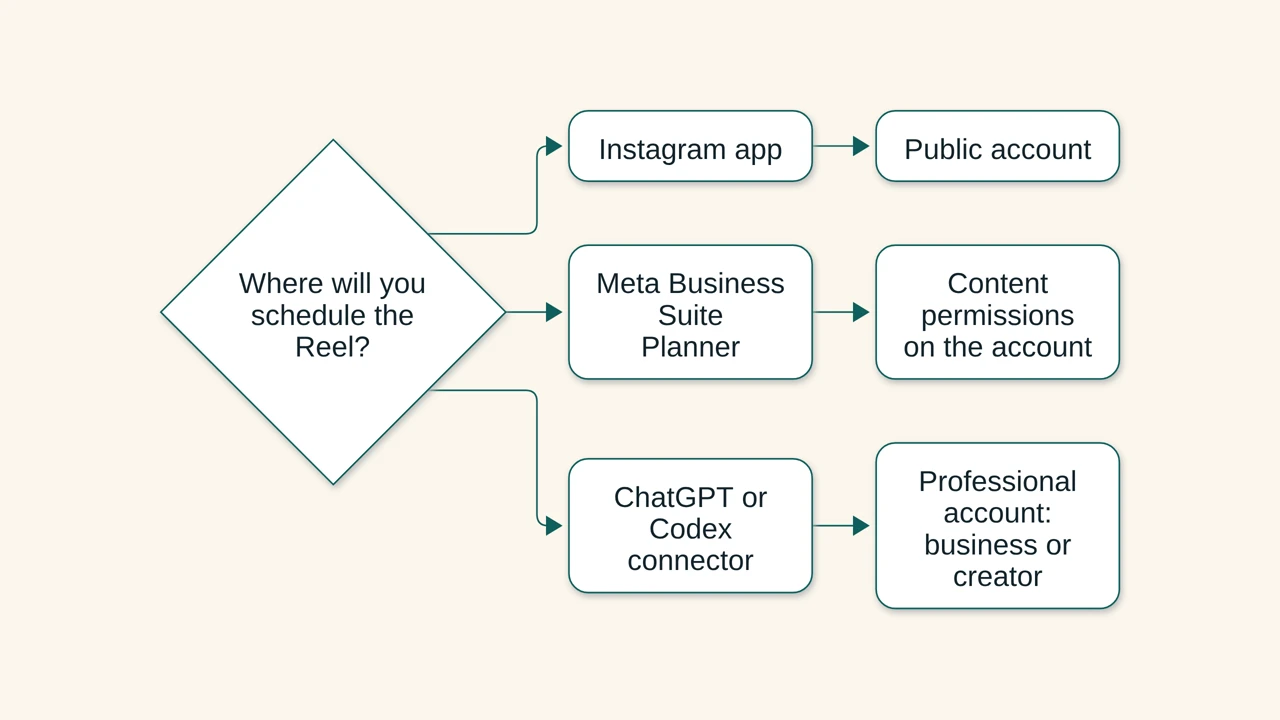
Two different checks apply, depending on the route:
- In the Instagram app: Instagram's scheduled-content help page (read 2026-10-23) says "you must have a public account on Instagram". It does not ask for a business or creator account, and it does not mention a linked Facebook Page.
- Through the publishing API: Meta's Instagram Platform overview (read 2026-10-23) says the platform "allows your app to access data for Instagram professional accounts, including business and creator accounts". A personal account is not served by the API at all.
So the common claim that scheduling needs a professional account is only true for the API route. If the Schedule option is missing in the app, check whether the account is private before you go looking for a business setting.
Step 2 — Schedule the Reel in the Instagram app
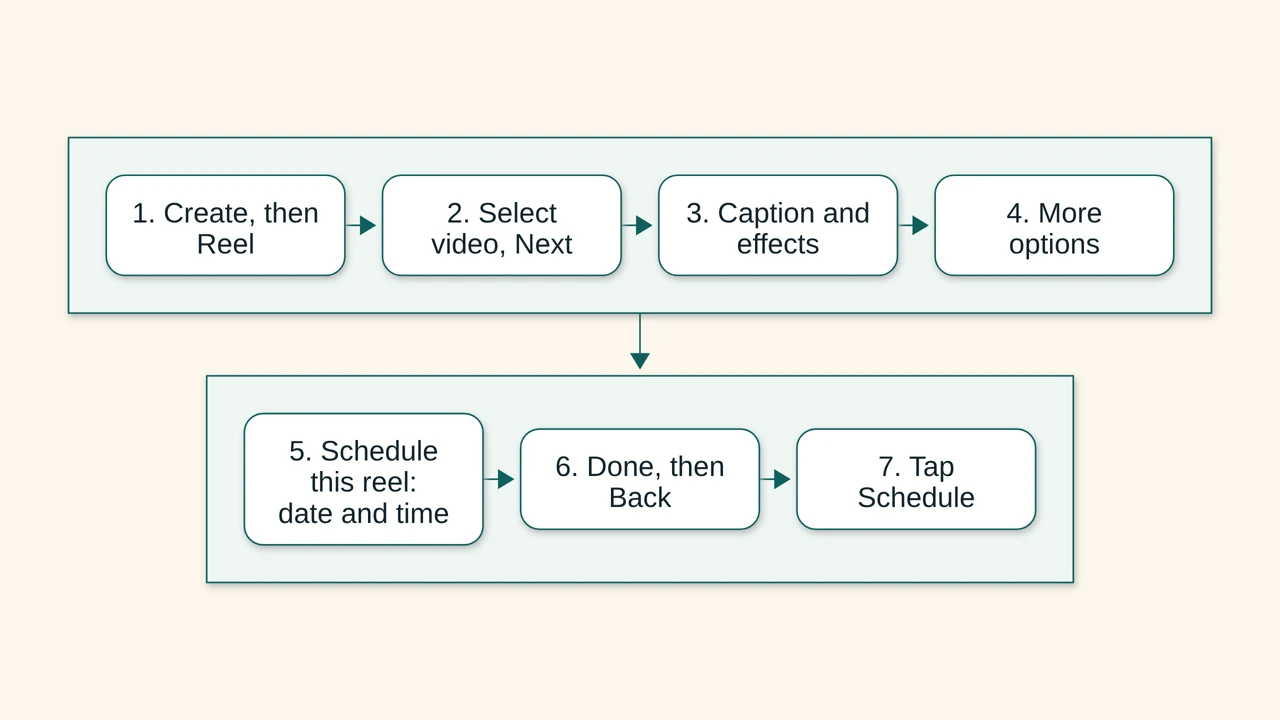
The order matters, because the scheduling toggle is below the caption screen:
- Tap Create in the top left, or swipe right anywhere in Feed, then tap Reel.
- Select the video, then tap Next.
- Add the caption, effects or filters.
- Tap More options.
- Turn on Schedule this reel, then choose the date and time.
- Tap Done, then Back.
- Tap Schedule to put it in the queue.
The same page notes that your scheduled content keeps the privacy and audience settings that were configured when you scheduled it, so changing a setting later does not silently change the queued Reel.
Step 3 — Or schedule it in Meta Business Suite Planner
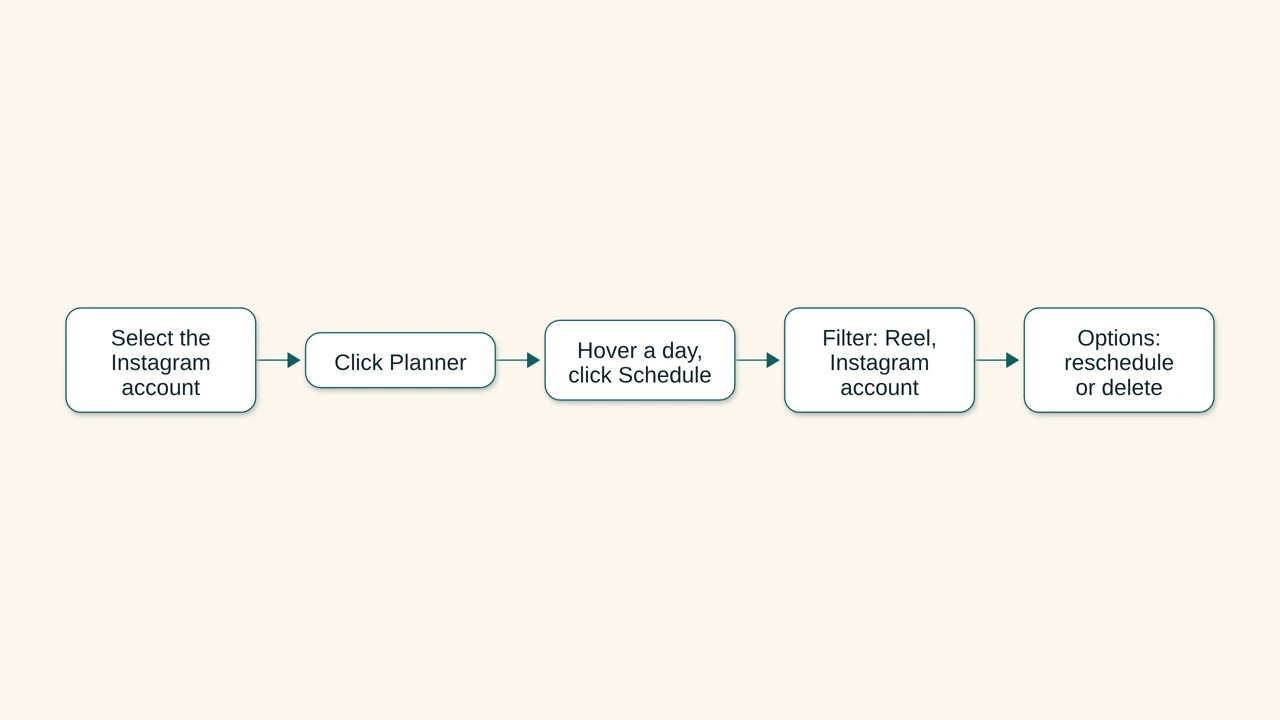
Planner is Meta's calendar for a Page and an Instagram account together (help page read 2026-10-23):
- Open Meta Business Suite and select the Instagram account in the top-left dropdown.
- Click Planner. If it is missing, you lack content permissions on that account.
- Hover an upcoming day and click Schedule, then choose what to schedule.
- In the calendar, filter Content type: all to Reel to see only Reels, and Shared to: all to Instagram account to drop the Facebook Page.
- Click an upcoming Reel and use Options to reschedule or delete it.
Planner also shows content that Meta says was "scheduled in Meta Business Suite", so a Reel queued from the Instagram app is not guaranteed to appear in the same view. Check the app's own queue before you assume Planner is empty. The free scheduling guide covers the same Planner permissions for posts and stories if you are lining up more than one content type.
Step 4 — Schedule the Reel from ChatGPT or Codex
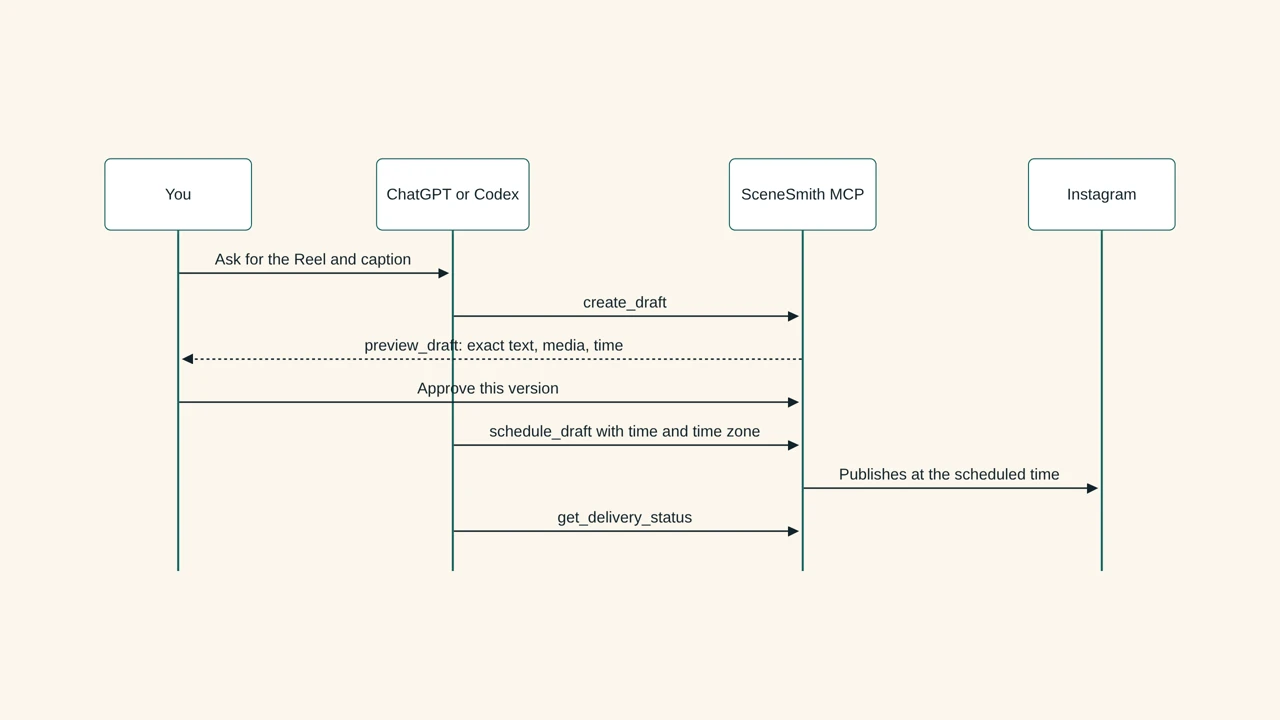
This is the route for a caption that starts in a chat. SceneSmith's connector is a hosted MCP server at https://app.scenesmith.design/api/mcp, and SceneSmith's connection page (read 2026-10-23) lists ChatGPT, Codex, Cursor, VS Code and Devin as clients you can add it to. Claude is not on that list today, so no Claude instructions here.
The Reel itself is a supported post type: SceneSmith's live tool schema (read 2026-10-23) includes instagram_reel alongside single images and carousels. The publish step never takes a bare "post this now":
create_draftbuilds the Reel draft with the caption and the media.preview_draftreturns the exact text, media, handle and time, tied to a draft version.schedule_draftrequiresdraftId,version,confirmationHash,scheduledForUtc,displayTimezoneandidempotencyKey— a time and a named time zone are mandatory fields, not optional ones.list_calendarandget_delivery_statusanswer "is it queued, and did it post", andreschedule_postorcancel_scheduled_postchange it after the fact.
Two honest limits. SceneSmith's own free workspace lets you connect accounts and preview three drafts, but scheduling and publishing need a trial or a paid plan (SceneSmith pricing page, read 2026-10-23). And the approval is tied to one version of the draft: if the caption changes, the earlier confirmation no longer applies, which is the behaviour you want on a Reel whose hook you rewrote at the last minute.
Why the Schedule option is missing
Walk this list in order; each item is documented, not guessed.
- The account is private. Instagram's page requires a public account for scheduled content.
- The content type is not schedulable. Instagram states that "product tagging, collaborative posts, sponsored posts and fundraisers" are not compatible with scheduled content at this time.
- You are in Business Suite without permissions. Planner asks for content permissions to create, manage and delete organic content.
- You are over the daily limit. The cap is 25 scheduled posts a day, which mixes photos, carousels and Reels.
How to check the Reel is really queued
In the app: open your profile, tap Menu, then Scheduled content under "Your insights and tools". Each entry has Options with Delete, Edit post, Reschedule and Share now. You can also see the same list from the composer by tapping Scheduled after starting a new post or Reel.
Through a connector: ask for the calendar, not for a promise. list_calendar returns what is queued, and get_delivery_status is the check after the scheduled time — a delivery that failed can be retried without rebuilding the post.
Questions readers ask
Can I schedule an Instagram Reel more than 30 days ahead?
Not in the Instagram app. Instagram's scheduled-content page caps scheduling at 30 days in advance, and at 25 scheduled posts a day. Anything further out has to wait, or live in a planning tool that is not Instagram's own queue.
Do I need a professional account to schedule a Reel?
Not for the in-app route: Instagram's page asks for a public account. You do need one for API-based publishing, because Meta's Instagram Platform serves professional accounts — business and creator accounts — and not personal profiles. A connector such as SceneSmith publishes through that API, so treat a professional account as the requirement for the chat route.
Why is "Schedule this reel" not showing?
Most often the account is private, or the Reel carries something Instagram excludes from scheduled content, such as product tagging, a collaborative post, a sponsored post or a fundraiser. In Business Suite the equivalent cause is missing content permissions.
Can ChatGPT schedule an Instagram Reel for me?
With a connected publishing server, yes: the assistant creates the draft, you approve an exact preview version, and the schedule call carries the time and the time zone. Without a connector, ChatGPT has no Instagram credentials and the post stays text in the chat. The plan and surface guide covers which ChatGPT route can hold the connection, and the Codex guide walks the same flow from a terminal.
Does scheduling a Reel from a tool still post it if I am offline?
Yes, that is the point of a queue, but only the queue you actually wrote to. A Reel scheduled in the Instagram app lives in Instagram's scheduler, and a Reel scheduled through a connector lives in that tool's calendar; one does not populate the other. Check the calendar of the tool you scheduled in.
Sources
- Instagram Help Center: How to create and manage scheduled posts and Reels on Instagram — read 2026-10-23. Source for the public-account requirement, the 25-posts-a-day and 30-day limits, the in-app steps, the content types excluded from scheduling, the retained privacy settings, and the Scheduled content menu path.
- Meta Business Help: Use Planner in Meta Business Suite on desktop — read 2026-10-23. Source for the calendar covering posts, stories, Reels and ads, the content-permission requirement, the Reel content-type filter, scheduling from Planner, and rescheduling or deleting from the calendar.
- Meta for Developers: Instagram Platform overview — read 2026-10-23. Source for the statement that the platform serves Instagram professional accounts, business and creator.
- SceneSmith MCP tool schema,
POST https://app.scenesmith.design/api/mcpwithtools/list— read 2026-10-23. Source for theinstagram_reelformat, the requiredschedule_draftfields, and thelist_calendar,get_delivery_status,reschedule_postandcancel_scheduled_posttools. - SceneSmith connections — read 2026-10-23. Source for the client list and the production MCP endpoint.
- SceneSmith pricing — read 2026-10-23. Source for the free workspace limits and the trial-or-paid requirement for scheduling and publishing.